
- Setting
- E-filing before the Allahabad High Court
- Document
- A petition of 184 pages
- Requirement
- A visible signature on every page, checked at scrutiny
- Before
- Page-by-page signing in Adobe Acrobat: 3 to 4 hours or more for a full document
- With an early build
- 30 to 45 minutes in total, most of it spent placing signature fields in Acrobat
- Result
- Submitted after 20 January 2026; passed scrutiny by 27 January; listed for hearing on 30 January
- Testing
- Version 1.0 tested by about 17 people
- Availability
- Version 2.0, free and open source under the GNU GPL v3.0 or later, for Windows, Linux and macOS
Summary
E-filing before the Allahabad High Court requires a visible signature on every page of a filing, and some pages need several. The first time I met this requirement, I signed a full document page by page in Adobe Acrobat, and it took me three to four hours or more.
I then wrote my own signing tool. In January 2026, an early unreleased build of it signed a 184-page petition with my Digital Signature Certificate (DSC) in 30 to 45 minutes in total. The petition was submitted after 20 January, passed scrutiny without objection by 27 January, and was listed for hearing on 30 January 2026.
The tool went through further unreleased builds and version 1.0, which about 17 people tested. Version 2.0 rests on one observation: however many signatures a document carries, one digital signature is enough to protect its integrity, while compliance requires a visible signature on every page. Version 2.0 therefore places the visible signatures on every page and secures the whole file in one signing step, with one PIN entry.
Version 2.0 is free software under the GNU GPL v3.0 or later, with packages for Windows, Linux and macOS [1, 2].
Terms used in this case study
These terms are defined here once and used in the same sense throughout.
- Stamp: the visible signature drawn on a page, showing a name, reason, location and date, and optionally an image of a handwritten signature. A stamp is a mark for the reader. On its own it proves nothing.
- Digital signature: a cryptographic value stored in the PDF, created with the private key on a DSC token. It identifies the signer and shows whether the file has changed since signing [1].
- Timestamp seal (seal): a token from a Time Stamping Authority (TSA) showing that the file existed in its current form at a given time. It does not identify the person who requested it [3].
- Signature field: a placeholder area in a PDF, prepared in advance, where a signature is later applied.
- Scrutiny: the registry's check of a filing before it is accepted.
- The application: Bulk Field Signer, distributed from version 2.0 onward as PDF DSC-TSA Bulk Signer.
The problem
The requirement
Scrutiny of an e-filing before the Allahabad High Court expects a visible signature on every page. Some pages need more than one. An affidavit page, for example, can need three or four: the deponent's signature twice, the applicant's once, and sometimes the advocate's as well. A 184-page petition therefore needs at least 184 visible signatures, and more where a page needs several.
Signing page by page in Acrobat
The first time I faced this, I signed manually in Adobe Acrobat, one signature at a time. Signing every page took me three to four hours or more. In my experience, most of that time went into Acrobat rendering each signature after it was applied, before I could move on to the next.
Other options
| Option | Problem |
|---|---|
| Print, sign by hand, scan | Produces an image-based PDF with no digital signature, which defeats the purpose of e-filing. |
| Paste a signature image on each page | Produces stamps but no digital signature, so nothing shows who signed or whether the file was changed afterwards. |
| Commercial bulk-signing software | My assessment at the time was that the products I could find were licensed and priced for organisations rather than for an individual advocate. |
Constraints
From that experience I set these constraints for a tool of my own:
- It must work with the DSC tokens advocates already hold.
- It must handle many signatures on many pages, including several on one page.
- It must never alter or overwrite the original PDF.
- Confidential documents must not be uploaded to a signing service.
- It must be free to use.
How the tool developed
Stage 1: Acrobat fields, signed in bulk by my own build
My first build did not draw anything itself. I placed signature fields on the pages in Acrobat, and my build then signed every field with my DSC in one run. Each field received its own digital signature, but the token PIN was entered only once. This is where the name Bulk Field Signer comes from.
This build signed the 184-page petition in January 2026, using my DSC without a timestamp. The whole job took 30 to 45 minutes. Most of that time went into placing the signature fields in Acrobat; the signing itself ran in one pass. The petition was submitted after 20 January 2026, passed scrutiny without objection by 27 January, and was listed for hearing on 30 January.
Stage 2: removing the dependency on Acrobat
A later unreleased build placed the signature fields itself, so Acrobat was no longer needed. I gave this build to some friends who also file electronically. Their use exposed two limitations: the build had no proper graphical interface, and its PDF viewer did not work on all the major operating systems.
Stage 3: version 1.0
Version 1.0, released as BulkFieldSignerGUI, added a graphical interface and resolved those two limitations. It provided bulk PDF signing with DSC tokens and an MSI installer for Windows, under a proprietary licence [2]. About 17 people tested it.
Stage 4: version 2.0
Up to version 1.0, every signature field carried its own digital signature. That design has costs. A PDF stores each digital signature as a separate revision of the file, so a document with hundreds of signatures becomes larger and slower to open and verify, and the reader has hundreds of signatures to check.
Working on version 2.0, I looked again at what scrutiny actually needs. It needs two separate things:
- Compliance: a visible signature on every page, where the registry expects it.
- Integrity: proof of who signed and that the document has not changed since. One digital signature over the complete file provides this for every page at once [1, 2].
Version 2.0 is built on that separation. It draws a stamp at every position the user chooses, as many as needed on any page, and secures the whole file in one signing step [2]. Compared with one signature per field:
- the file carries one signature, not one per field, so it stays smaller and faster to open;
- verification means checking one signature;
- the user draws stamp positions directly; no signature fields have to be prepared first.
Version 2.0 also changed the licence to the GNU GPL v3.0 or later. It added a timestamp seal, a stamp designer, safe saving, Linux and macOS packages and signed updates [2]. The 2.0 installer replaces 1.0 automatically [2].
After stamps are placed, the main window shows the result, for example "3 stamps on 3 pages · secured by one signature".
Version 2.0 in detail
Three ways to secure a document
| DSC only | DSC with timestamp | Timestamp seal only | |
|---|---|---|---|
| The user needs | A DSC, usually on a USB token | A DSC and an internet connection | An internet connection and a name |
| The stamp reads | "Digitally signed by" the name on the certificate | "Digitally signed by" the name on the certificate | "Declared by" the typed name, and "Sealed by" the TSA |
| It shows | Who signed, and that the file has not changed since | The same, plus independent evidence of the signing time | Only that the file has not changed since it was sealed |
Source: [1].
DSC. The application lists the personal signing certificates available on the computer and refreshes the list when a token is inserted. Expired certificates and unplugged tokens appear greyed out with the reason shown [1, 2]. DSC signing without a timestamp works offline [1].
Timestamp. RFC 3161 defines how a client sends a TSA a hash of the data and receives a signed token stating that the data existed at a given time. The TSA timestamps only the hash and does not include the requester's identity in the token [3]. Only the document's fingerprint leaves the computer. The application offers DigiCert, Sectigo, GlobalSign, SSL.com and Entrust as TSAs [1].
Timestamp seal only. A seal does not identify anyone, so the application never labels it as a signature. A sealed stamp always reads "Declared by", never "Digitally signed by", and the interface explains the difference next to the name field (Figure 1). Custom stamp designs cannot override this. The {heading} placeholder resolves to "Digitally signed by" for a signature and to "Declared by" for a seal (Figure 3).
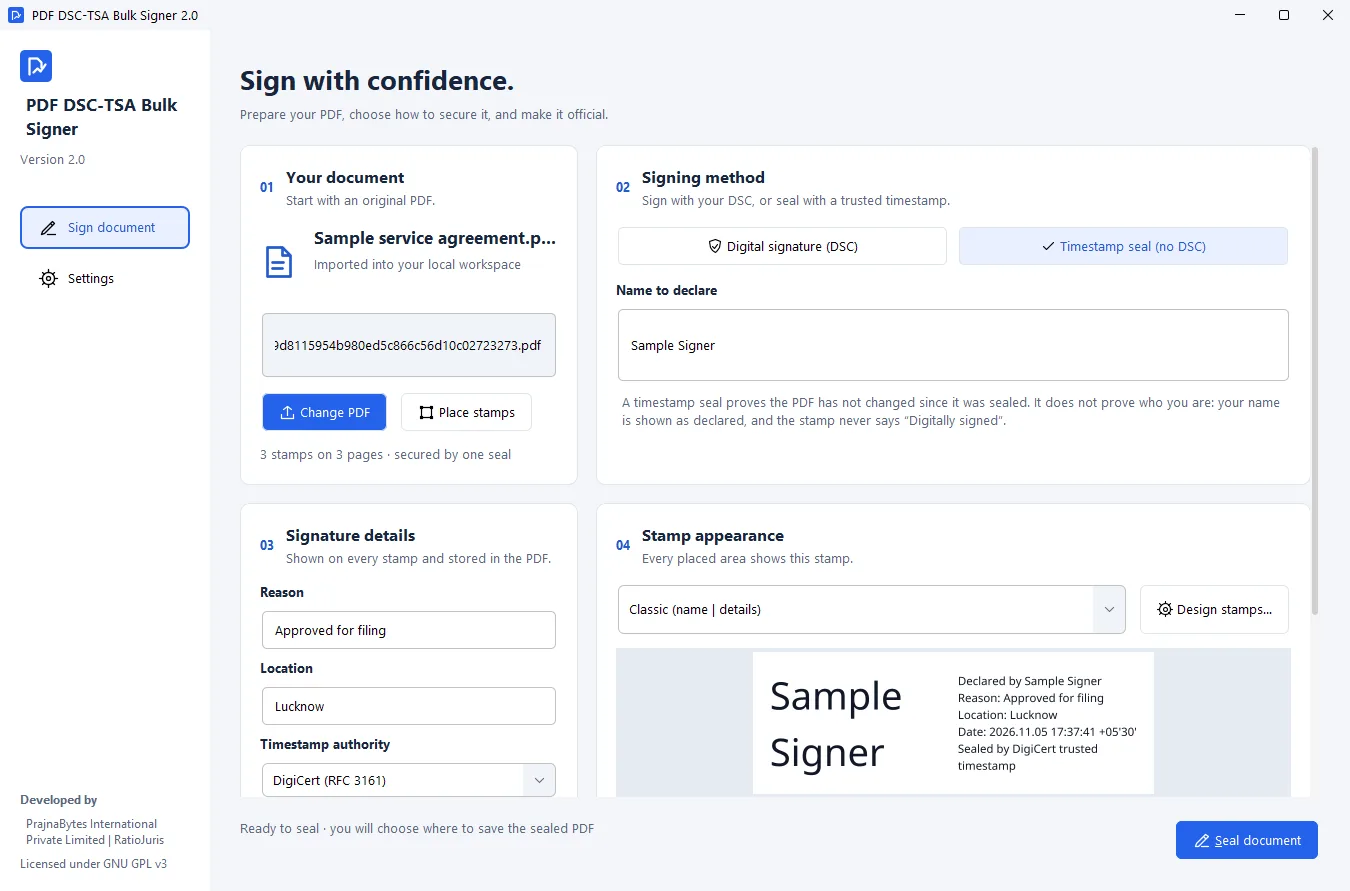
Figure 1. Timestamp seal mode. The note under the name field states what a seal does and does not prove.
Placing stamps
The user draws a box where a stamp should go. Repeat on all pages copies it to the same position on every page. More boxes can be drawn or duplicated on any page, for example for the three or four signatures an affidavit page needs. Boxes can be moved or deleted, and one page can be cleared without affecting the others (Figure 2).
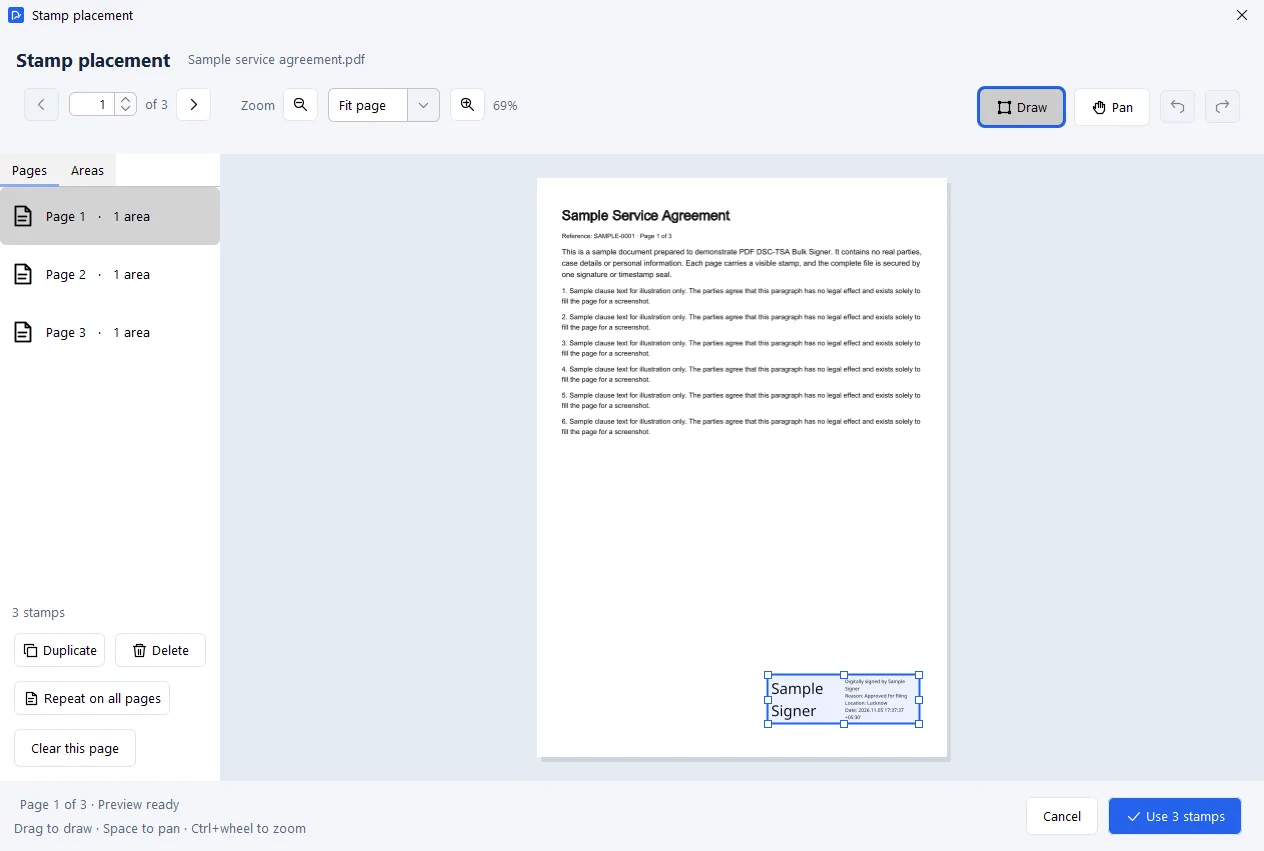
Figure 2. The stamp placement editor. The page list shows how many stamp areas each page carries.
Signature details and stamp design
The reason and location entered by the user appear on every stamp and are stored in the signed file [1]. The stamp designer builds layouts from these placeholders:
{heading},{name},{reason},{location},{date}{issuer},{tsa},{page},{pages}
Users can add a PNG image of a handwritten signature and choose layout, ink colour, date format and border, with a live preview (Figure 3). Devanagari script is supported, so stamps can be written in Hindi [1, 2].
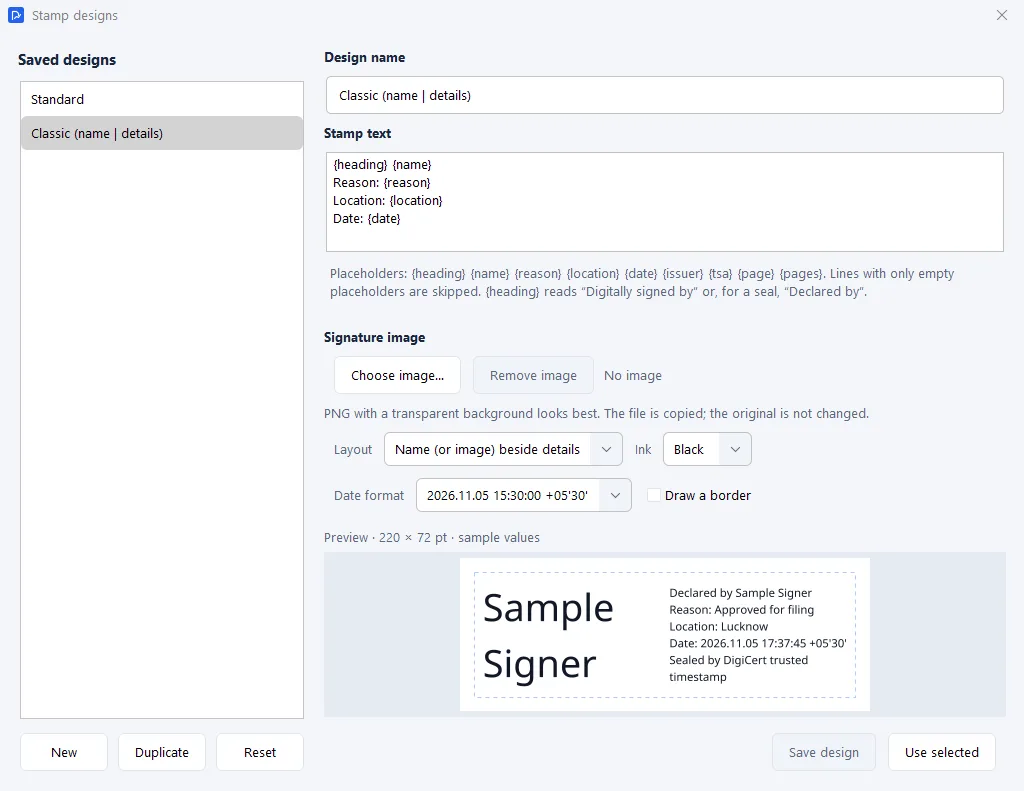
Figure 3. The stamp designer, with a live preview.
Document permissions
The user can restrict editing, content copying or printing. The restrictions are applied before signing, cannot be removed afterwards, and are available only for PDFs that are not already signed (Figure 4). PDF reader software applies these restrictions. They do not control who receives the file.
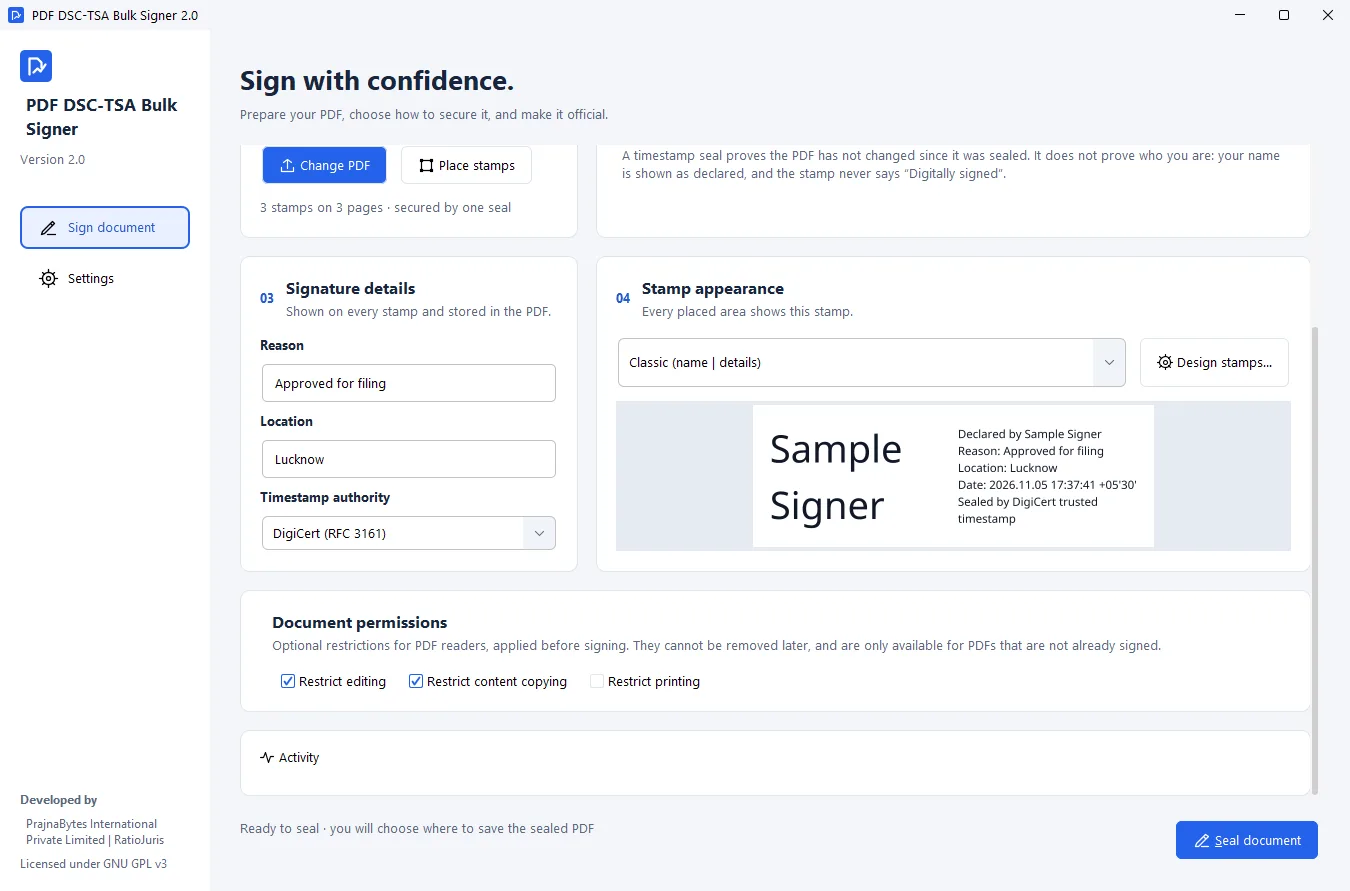
Figure 4. Signature details, stamp appearance and document permissions, with the Activity panel below.
Safeguards
- The original is only read. The application signs a copy. When signing ends, a Save window opens in the original's folder with a suggested name such as "Agreement - signed.pdf", and the application will not let the original be overwritten [1, 2].
- A recoverable copy. If the user cancels the Save window, a copy remains in the application's local output folder [1].
- Documents stay local. Files are not uploaded. Only a hash is sent when a timestamp is used [1].
- A record of each step. The Activity panel logs each step and the reason for any failure [1].
- Signed updates. Updates are installed only if their release metadata is signed by the developer and matches a checksum. If a mandatory security update is published, signing pauses until it is installed [1, 2].
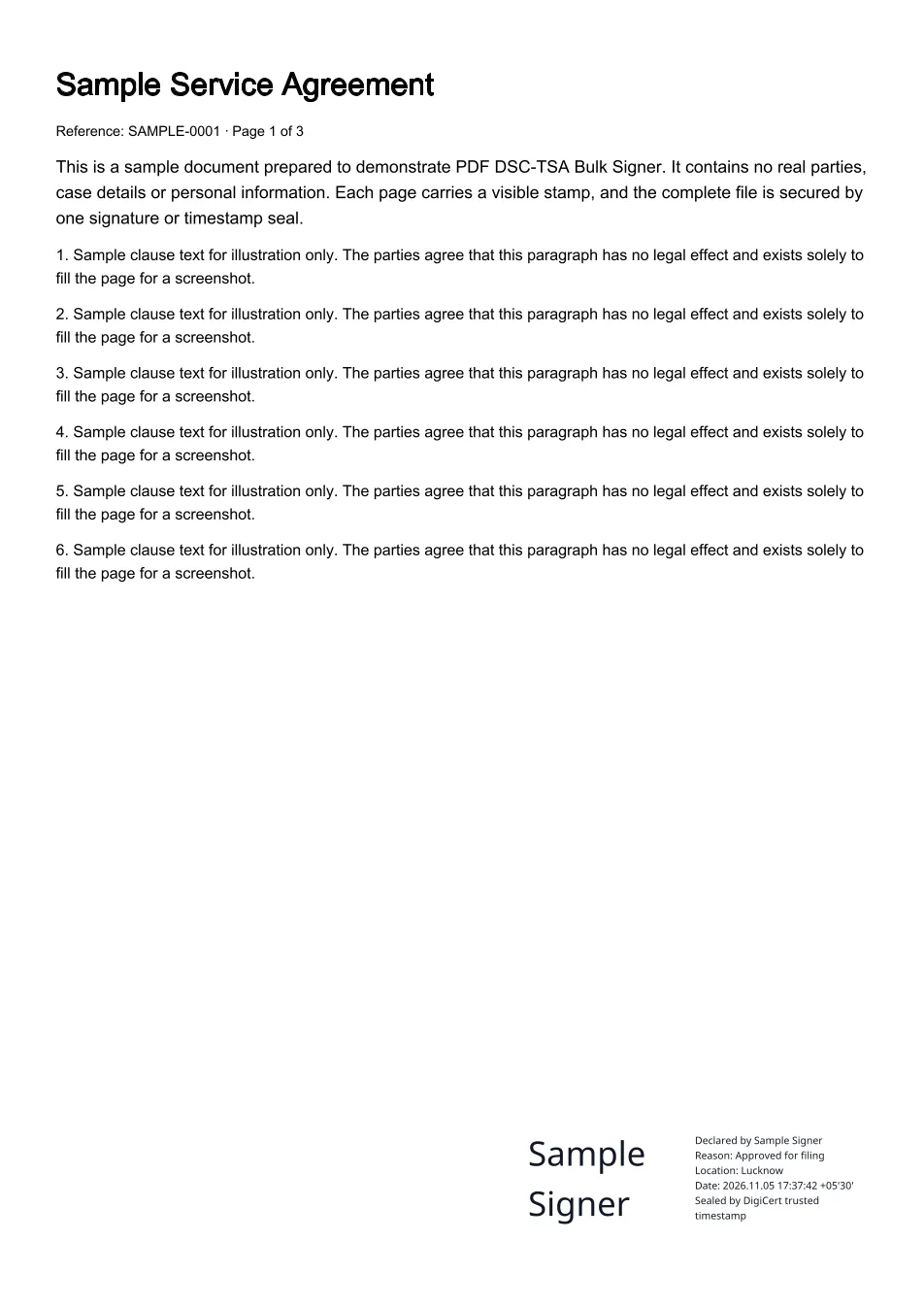
Figure 5. A page of the sealed sample document, with the stamp at the lower right.
The workflow
- Import the PDF.
- Choose DSC and select the certificate, or choose timestamp seal and type the name to declare.
- Enter the reason and location. Choose a TSA if one is wanted (it is required for a seal).
- Choose a stamp design.
- Open Place stamps, draw a box, click Repeat on all pages, and add or adjust stamps on pages that need more than one.
- Optionally set document permissions.
- Click Sign document or Seal document. A DSC token asks for its PIN once.
- Choose where to save the output.
- Open the output in a PDF reader and check in the Signature panel that the signature is valid and the document unmodified.
The steps are the same for a 3-page agreement as for a 184-page petition. Only step 5 grows with the document, and only where individual pages need extra stamps or adjustments.
Technical summary
| Area | Implementation |
|---|---|
| Runtime | Java, with a bundled Microsoft Build of OpenJDK 25 runtime [2] |
| PDF handling and signing | iText and Apache PDFBox [1] |
| Cryptography | Bouncy Castle [1] |
| DSC tokens | Windows certificate store on Windows; PKCS#11 libraries on Linux and macOS [1, 2] |
| Native access | JNA [1] |
| Timestamps | RFC 3161 [3], with five TSAs to choose from [1] |
| Interface | FlatLaf; Noto fonts [1] |
| Packages | Windows portable ZIP and MSI; Linux tar.gz and .deb; macOS .dmg [2] |
| Distribution | GitHub Releases with SHA-256 checksums [1] |
The components listed are open source under their own licences, as listed in the project repository [1].
After release, version 2.0 was tested by signing with a HyperPKI HYP2003 token carrying a Verasys DSC on Windows 11, with and without a DigiCert timestamp [2].
Outcome
For the petition
The 184-page petition was signed with an early build of the tool in 30 to 45 minutes. Signing a full document by hand in Acrobat had previously taken me three to four hours or more. The petition passed scrutiny without objection within a week of submission and was listed for hearing on 30 January 2026.
For other users
- Testing: friends who file electronically used an early build, and about 17 people tested version 1.0.
- Cost: version 2.0 is free to download and use [1].
- Inspectable code: under the GNU GPL v3.0 or later, anyone can read, modify and redistribute the source [1, 2]. For software that handles signing keys and confidential documents, users or their advisers can check what it does instead of relying on the publisher's description.
- Platforms: packages are published for Windows, Linux and macOS, with the Java runtime included [2].
- Users without a DSC: the seal gives them a way to show a document has not changed, and the stamp states what it does and does not prove.
- Hindi: stamps can be written in Devanagari [1, 2].
Before you file
- The registry decides what it accepts. A digital signature shows who signed and that the file is unchanged. Whether a registry accepts a DSC signature, a seal or a particular stamp layout is for that registry to decide [1]. The petition in this case study was signed with a DSC.
- Use a DSC where identity matters. A seal shows that a document has not changed; a DSC also shows who signed it [3].
- Check the result in a PDF reader. The evidence is the digital signature or seal, shown in the reader's Signature panel. Whether the reader marks a signature as trusted depends on its settings for the certifying authority [1].
- One PDF per run. Any number of pages in that PDF can carry stamps.
- Supported files. PDFs up to 256 MB and 10,000 pages. Password-protected PDFs, certified PDFs and PDFs whose existing signatures restrict changes are left unchanged [1].
- Internet. Seals, timestamps and update checks need a connection; DSC signing without a timestamp works offline [1].
Lessons
- Separate compliance from integrity. Scrutiny asks for a visible signature on every page. Integrity needs only one digital signature over the whole file. Treating them as one requirement meant one digital signature for every visible signature. Separating them led to version 2.0.
- Remove the slowest dependency first. The early build signed in one pass but still relied on Acrobat to place signature fields, and that step took most of the 30 to 45 minutes. From stage 2 onward, the tool placed signature positions itself, which removed that step.
- Real users find real limits. Friends using an early build found that it lacked a graphical interface and did not run its PDF viewer on all major operating systems. Version 1.0 addressed both.
- Label assurance accurately. A seal and a signature prove different things. Building that difference into the stamp text means a user cannot accidentally overstate it to a court.
- Make irreversible actions hard to do by accident. Signing a copy, refusing to overwrite the original and keeping a recoverable output protect the user from mistakes that cannot be undone.
Availability
- Downloads: https://github.com/RatioJuris/BulkFieldSignerGUI/releases (s’ouvre dans un nouvel onglet)
- Issues and feature requests: https://github.com/RatioJuris/BulkFieldSignerGUI/issues (s’ouvre dans un nouvel onglet). Do not attach confidential documents, certificates or PINs.
Services PrajnaBytes associés
PDF DSC-TSA Bulk Signer is free to download. PrajnaBytes also customises it as a desktop application, or builds it into a web application, for organisations that need their own workflow.
- Software and Business Systems
Custom web and mobile applications and business systems that replace manual processes, disconnected spreadsheets and ageing software.
- PDF DSC-TSA Bulk Signer · Bulk PDF stamping and signing
Open-source desktop software, released for the community, that puts a visible stamp on every page you choose and secures the whole PDF with one Digital Signature Certificate (DSC) signature or one RFC 3161 timestamp seal.
Partager votre besoin
Need bulk signing adapted to your court, office or workflow? Tell us what you need, and we will propose a customised desktop or web version.
La lecture est libre et ne demande aucune information. Nous ne demandons vos coordonnées que si vous décidez de nous écrire.
À propos de cette publication
Relecture. Checked by Isrg Rajan on 5 November 2026 against his own filing records and the project's README and CHANGELOG.
Références
- PDF DSC-TSA Bulk Signer: README, version 2.0 (s’ouvre dans un nouvel onglet). RatioJuris, GitHub. Accessed 5 November 2026.
- PDF DSC-TSA Bulk Signer: CHANGELOG, entries 1.0.0 and 2.0.0 (s’ouvre dans un nouvel onglet). RatioJuris, GitHub. 5 November 2026.
- Internet X.509 Public Key Infrastructure Time-Stamp Protocol (TSP), RFC 3161 (s’ouvre dans un nouvel onglet). IETF (Adams, Cain, Pinkas and Zuccherato; updated by RFC 5816). August 2001.